Zettelkasten Method
Zettel Notes has first-class support for the Zettelkasten method.
Features
Backlinks
Backlinks are notes that link to the current note. In note information dialog, all note backlinks are listed. You can click on any backlink note to open it.
Wiki style links
Type [[ in the editor to pick a note and insert a link to it, e.g. [[note.md]].
Tip
To configure note links, go to Settings > Editor > Link Style. You can select among [[filename]], [[filename.md]], [[filename|title]], [[filename.md|title]], [[date]], [[date]] title, [title](filename), [title](filename.md) and [Title](../Filename.md).
Links can be relative to the current note, e.g. [[../file.md]] v2.7.2. To always insert absolute links (from the repository root), enable the absolute note links option in Settings > Editor and Viewer. Spaces in []() links are written as %20.
To create folder links, enter the absolute or relative folder path and add '/' at the end of link eg. [sub-folder](/sub-folder/). Clicking on this link will open the sub-folder folder.
Notes can also be linked using their id. The id is derived from the filename or the id property in the YAML frontmatter. You can configure the id detection pattern (regex) in the repository settings.
Tags
- Tags are denoted by
#tagor specifying tag in yaml - Type
#?to show tag search dialog - Read More
Authors
- Authors are denoted by
@authoror specifying author in yaml - Type
@?to show author search dialog
New Note from selection
You can create new note from selected text in editor. Just select some text in editor and click on Extract Note editor button in Editor
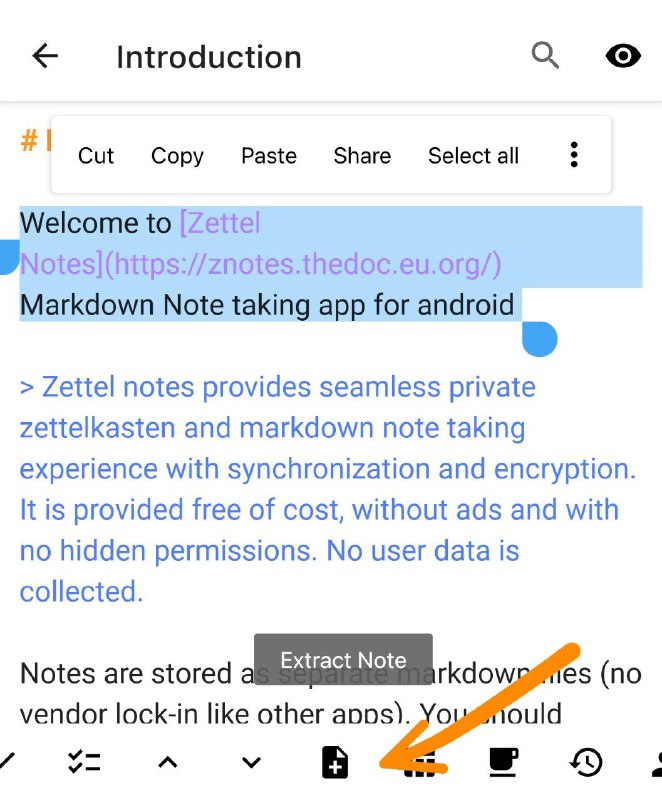
Table of contents
To display table of contents, add [TOC] anywhere in the note.
To enable table of contents for all notes, tick Table of Contents (TOC) settings option in Settings > Editor and Viewer.
Tip
Table of contents can be customized per note using the following [TOC:min=1,max=2,symbol=round] syntax. Following symbols are supported arrow ➔,check ✔,circle ◯,dash -, diamond ◆,dot •, dot_large ⬤,square ■,star ★,and triangle ▶. Here min and max are the minimum and maximum heading levels to use.
Inline Heading links
To create inline heading links add # in front of link eg. [Heading](#heading). Clicking on inline heading link will scroll to the specific heading. You will need to replace spaces and non-alphanumeric characters in heading with hyphen in the link.
Example
Inline link for # This is a heading will be [link](#this-is-a-heading).
Learn more about Zettelkasten method 📖
The Zettelkasten method builds knowledge from short notes, each holding a single idea, that are densely linked to each other.
For a thorough introduction, see zettelkasten.de/introduction.